
You can use mirethMusic to convert between the following formats.
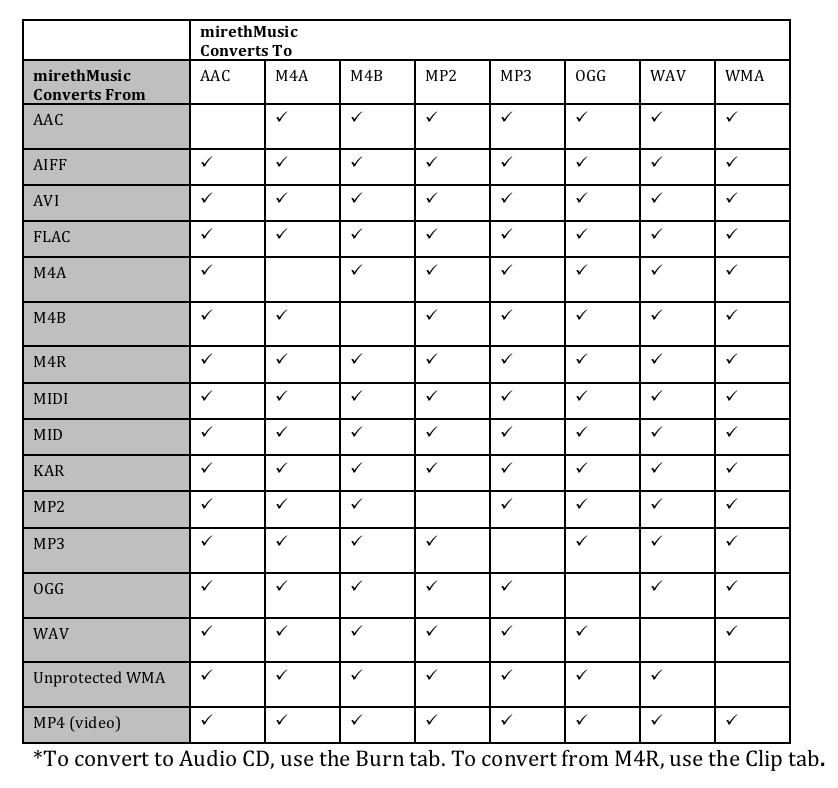
Please note: mirethMusic
- DOES NOT convert DRM protected .m4p, AAC or WMA files (More info)
- DOES convert FROM unprotected AAC (M4A, M4B), and TO unprotected AAC (M4A, M4B).
- DOES convert FROM or TO unprotected WMA. May require the WMA Component. Click here for more information About WMA on Mac
Requirements
- mirethMusic
- To convert to MP3, you need to install the LAME component. See the System Requirements
How to convert to MP3 and more on Mac
- Click the Convert tab.

click to enlarge - If required, use the Advanced Settings on the Convert Menu to configure the quality. Remember that the better the quality you choose, the larger the file will be on your hard drive. For further information, refer to the mirethMusic Read Me (pdf)
- Select the files you want to convert. For further information, refer to the mirethMusic Read Me (pdf)
- Click the Convert drop down menu and select the format you want to convert TO. (For example, to convert a file to Mp3, select “To MP3”.
- Select the folder where the converted files are to be stored and click the Save button. Conversion will now start.
Note: This may take a long time, depending on the how many files you are converting.


mirethMusic Help
- Read the FAQ
- Go to the mirethMusic Tutorials
- Read the mirethMusic Documentation
- Refer to the mirethMusic Specifications and System Requirements
- Download mirethMusic
- Can’t find what you’re looking for? Contact Support
Your Next Step
Get It Now
mirethMusic – Available from The App Store

Get It Now
Get it now
$24.95 US
Download Trial
Download
Free Trial