Music Man Tutorial - How to convert AAC, M4A, M4B, WAV, WMA, Ogg, MIDI, Audio CD, AIFF to MP3 on Mac OS X using Music Man: MP3 Converter for Mac OS X
Mireth Logo
About Us Contact Us News
separator separator separator separator separator separator

Music Man Tutorial

Quick Start
How to install Music Man
How to upgrade Music Man
Ripping
How to rip Audio CD to Ogg
How to rip Audio CD to AAC
How to rip Audio CD to AAC (M4A)
How to rip Audio CD to AAC (M4B)
How to rip Audio CD to MP3
How to rip Audio CD to WMA
How to rip Audio CD to both MP3 and M4A
Converting
How to convert to Ogg
How to convert to AAC (M4A)
How to convert to AAC (M4B)
How to convert to WMA
How to convert to WAV
How to convert to MP3
How to convert to Audio CD
Burning
How to burn an MP3 CD
How to an MP3 DVD
How to burn a Music CD (WAV, WMA, Ogg, AAC)
How to burn a Music DVD (WAV, WMA, Ogg, AAC)
How to burn an Audio CD
How to burn DVD- Audio
Playing
Playback Controls
How to Play
Features
How to make an MP3 clip

Music Man for OS X

Overview
Key Features
Tutorial
Specifications
System Requirements
Screen Shot
FAQ
User's Manual (pdf)
News
Reviews, Customer Comments
Upgrade Info

music man mac os x converter ripper burner player Music Man
Converter, Ripper, Burner, Player
Mac OS X 10.2.3 +
Click here to download Music Man free demo
Download
Free Trial
Music Man
$34.95
(CD-ROM)
Music Man Download
$24.95
(Download)
Music Man
windows logo

Mireth Multimedia Software

iVCD
DVD, VCD, SVCD Converter/Burner
MacVCD X
VCD/Video Player
for Mac OS X
MacVCD
VCD/Video Player
for Mac OS 9, Mac OS 8
Music Man
MP3/WAV/Ogg Ripper/ Converter/Burner/Player

How to convert an audio file
from Ogg, AAC (M4A), AAC(M4B), WAV, WMA,
Midi(MID or KAR), Audio CD, AIFF
to MP3 on Mac OS X
using Music Man Converter Tab

Use this procedure to convert Ogg (Ogg Vorbis), AAC (M4A or M4B), WAV or WMA to MP3 format.


Requirements

  • Music Man
  • Music File in Ogg (Ogg Vorbis), AAC(M4A), AAC(M4B), WAV, WMA, or Midi (MID or KAR) format
  • To convert to MP3, you need to install the LAME component. See the System Requirements


Instructions

1. Click the Music Man Convert Tab.

Music Man Convert Tab

show bigger


2. If required, use the Advanced Settings on the Convert Menu to configure the quality. Remember that the better the quality you choose the larger the file will be on your hard disk
For further information about Advanced Settings, refer to the Music Man Read Me (pdf)

Music Man Convert Tab


3. Select the files you want to convert. For further information, refer to the Music Man Read Me (pdf)

Click the Convert drop down menu and select the menu item titled "To MP3"

Convert to MP3 Mac OS X


4. Select the folder where the converted files are to be stored and click the Save button. Conversion will now start.

Note:
This may take a long time, depending on the how many files you are converting.


Notes

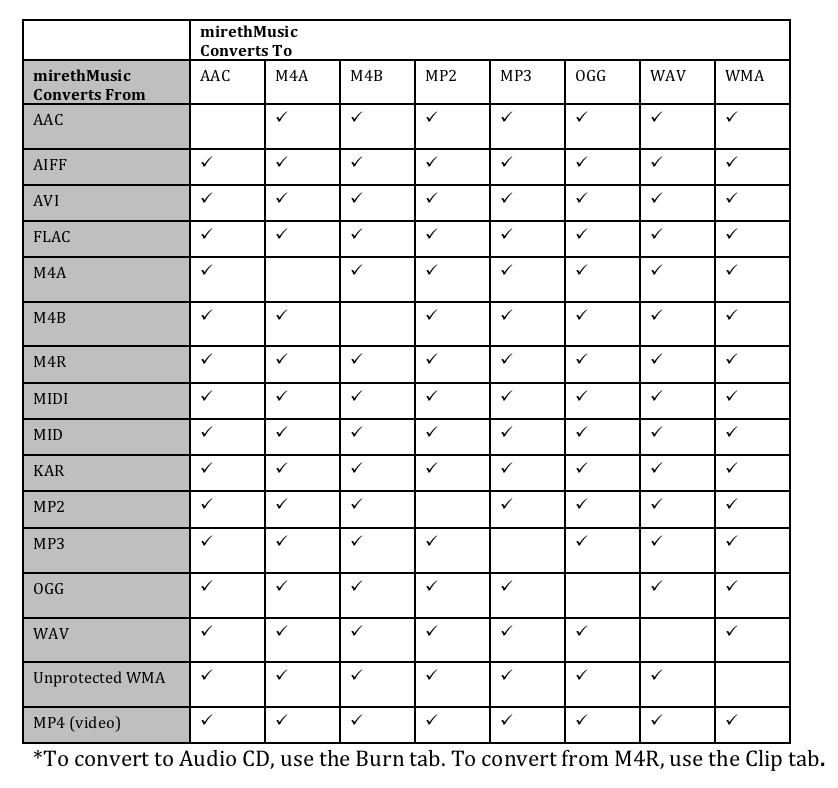
    Use Music Man to convert between these formats

    Convert To

    Convert From
    Audio CD/AIFF
    AAC/M4A
    AAC/M4B
    (unprotected AAC only)
    MP3
    Ogg
    (Ogg Vorbis)
    WAV
    WMA
    (unprotected only)
    Audio CD/AIFF (using the rip function) x yes yes yes no yes
    AAC/M4A
    (unprotected AAC)
    yes yes yes yes yes yes
    AAC/M4B
    (unprotected AAC)
    yes yes yes yes yes yes
    Midi
    (MID and KAR)
    yes yes yes yes yes yes
    MP3 yes yes yes yes yes yes
    Ogg
    (Ogg Vorbis)
    yes yes yes yes yes yes
    WAV yes yes yes yes yes yes
    WMA
    (unprotected only)
    yes yes yes yes yes yes
    Music Man
    • DOES NOT convert DRM protected AAC files (like iTunes purchased tracks). More info
      You can use Music Man to convert FROM unprotected AAC (M4A, M4B), and TO unprotected AAC (M4A, M4B).
    • DOES NOT convert .m4p files to other formats.
    • DOES NOT convert DRM protected WMA file More info
    • You can use Music Man to convert FROM or TO unprotected WMA. May require the WMA Component. Click here for more information About WMA on Mac

     
    iVCD | MacVCD | Music Man | NetShred | ShredIt | To The Trash!
    Home | Products | Demo | Download | Purchase | Support | Resources | News | About Us | Contact Us | Press Room | Privacy Policy | Site Map

    Mireth Technology New Feed (RSS 2.0) Copyright © 2001-2008 The Mireth Technology Corporation. All rights reserved. webmaster: support@mireth.com